Photo Extender Generative Fill1.5.0
Publisher Description



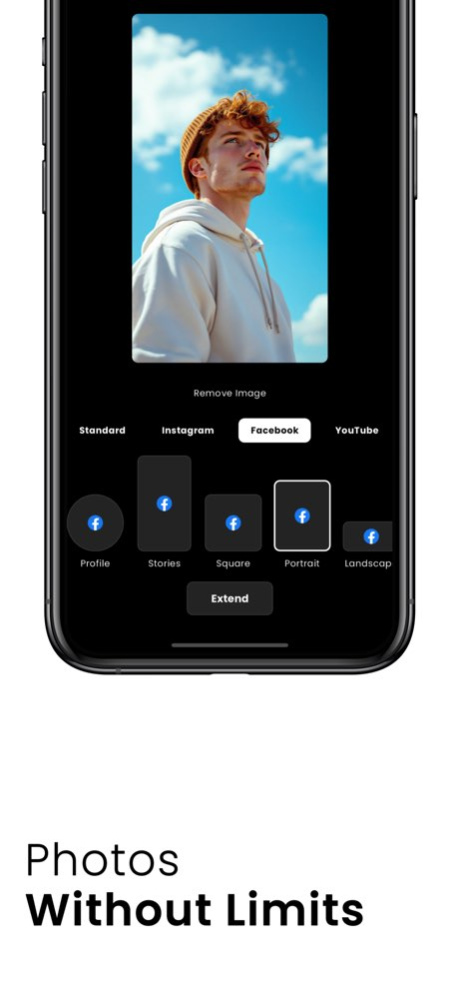
Photo Extender: Expand Any Image to Any Aspect Ratio
Transform your photos effortlessly with Photo Extender, the ultimate image expander that helps you adjust any picture to fit the perfect aspect ratio. Whether you're looking to insta size, uncrop, or outpaint, Photo Extender delivers magical results for social media, design projects, or creative purposes without needing borders or cropping.
Key Features:
. Seamless Photo Expansion: Extend your pictures while maintaining natural quality and composition.
. AI-Powered Magic Fill: Automatically outpaint and fill missing areas to create flawless image extensions.
. Customizable Aspect Ratios: Perfect for creating uncropped content for reels, posts, or stories.
. No-Crop and Border Remover: Keep your photos clean and professional-looking without unnecessary trims or edges.
. User-Friendly Interface: Quickly upload an image, set the desired dimensions, and let the app work its magic.
Whether you're enhancing a landscape, filling in a portrait, or resizing for a social media reel, Photo Extender is your ultimate tool for creativity.
Upgrade to Photo Extender Pro
Unlock the full potential of Photo Extender with Pro features that allow for advanced customization, magic outpainting, and ad-free editing.
. Subscribe for only $79.99 yearly, $11.99 monthly or $6.99 weekly and gain full access to premium features.
. A 3-day free trial may be offered for the yearly subscription
. Payment is charged upon confirmation of purchase.
. Auto-renewal ensures uninterrupted access but can be turned off anytime in your Account Settings.
. Renewals are processed 24 hours before the current subscription period ends, with costs clearly displayed.
Start transforming your photos, images, and pictures into masterpieces today!
Terms of Use: https://photoextender.com/terms
Privacy Policy: https://photoextender.com/privacy
Version History Extensions have been rebuilt from the ground up.
Your photos now extend in much finer detail. The picture you started with stays sharp, and the new area fills in around it. You can watch the frame come together while it generates.
One extension runs at a time, so each photo gets the full result. 1.5.0 6d ago • Batch extension - generate up to 4 extensions at the same time
• Extension history - no need to stay on the extension page without closing the app anymore, you can come back later and find it in your history 1.4.0 Jun 25 What's New in Photo Extender
• Custom Section - Create, save, and instantly access all your personalized aspect ratio formats in one dedicated space.
• Favorite Feature - Mark any format as a favorite with a single tap for lightning-fast reuse.
• Favorites Section -View and manage all your favorited formats in a clean, organized list.
• Recent Section - Quickly revisit and reapply your most recently used extension formats - no more searching through all the available formats.
These updates make customizing, saving, and reusing your perfect aspect ratios faster and more intuitive than ever.
Thanks for your support, enjoy the magic! 1.3.0 Apr 22 • You can now scale and pan your input photo 1.2.1 Feb 26 • You can now scale and pan your input photo 1.2.0 Feb 25 1.1.0 is Finally Here!
What's New:
• Dramatically improved colors – much more vibrant and natural
• Major Extension Upgrade – faster processing with significantly better quality and smarter outpainting
We've rebuilt the core technology to deliver higher quality image expansions, better color accuracy, and more natural results when uncropping or changing aspect ratios. 1.1.0 Jan 23 • Great improvements & fixes 1.0.8 04/14/2025 • Minor improvements 1.0.7 02/25/2025 • Minor improvements 1.0.6 02/18/2025 • Minor fixes and improvements 1.0.5 02/17/2025 • Minor improvements 1.0.4 02/16/2025 • Minor fixes and improvements 1.0.3 02/14/2025 • Added custom aspect ratio 1.0.2 02/13/2025 • Minor improvements 1.0.1 02/06/2025 1.0 02/06/2025
About Photo Extender Generative Fill
The company that develops Photo Extender Generative Fill is Kiplio, LLC. The latest version released by its developer is 1.5.0.
To install Photo Extender Generative Fill on your iOS device, just click the green Continue To App button above to start the installation process. The app is listed on our website since 2026-10-14 and was downloaded 1 times. We have already checked if the download link is safe, however for your own protection we recommend that you scan the downloaded app with your antivirus. Your antivirus may detect the Photo Extender Generative Fill as malware if the download link is broken.
How to install Photo Extender Generative Fill on your iOS device:
- Click on the Continue To App button on our website. This will redirect you to the App Store.
- Once the Photo Extender Generative Fill is shown in the iTunes listing of your iOS device, you can start its download and installation. Tap on the GET button to the right of the app to start downloading it.
- If you are not logged-in the iOS appstore app, you'll be prompted for your your Apple ID and/or password.
- After Photo Extender Generative Fill is downloaded, you'll see an INSTALL button to the right. Tap on it to start the actual installation of the iOS app.
- Once installation is finished you can tap on the OPEN button to start it. Its icon will also be added to your device home screen.
Program Details
System requirements
Download information
Pricing
Version History
version 1.5.0
posted on 2026-10-14
Version History Extensions have been rebuilt from the ground up.
Your photos now extend in much finer detail. The picture you started with stays sharp, and the new area fills in around it. You can watch the frame come together while it generates.
One extension runs at a time, so each photo gets the full result. 1.5.0 6d ago • Batch extension - generate up to 4 extensions at the same time
• Extension history - no need to stay on the extension page without closing the app anymore, you can come back later and find it in your history 1.4.0 Jun 25 What's New in Photo Extender
• Custom Section - Create, save, and instantly access all your personalized aspect ratio formats in one dedicated space.
• Favorite Feature - Mark any format as a favorite with a single tap for lightning-fast reuse.
• Favorites Section -View and manage all your favorited formats in a clean, organized list.
• Recent Section - Quickly revisit and reapply your most recently used extension formats - no more searching through all the available formats.
These updates make customizing, saving, and reusing your perfect aspect ratios faster and more intuitive than ever.
Thanks for your support, enjoy the magic! 1.3.0 Apr 22 • You can now scale and pan your input photo 1.2.1 Feb 26 • You can now scale and pan your input photo 1.2.0 Feb 25 1.1.0 is Finally Here!
What's New:
• Dramatically improved colors – much more vibrant and natural
• Major Extension Upgrade – faster processing with significantly better quality and smarter outpainting
We've rebuilt the core technology to deliver higher quality image expansions, better color accuracy, and more natural results when uncropping or changing aspect ratios. 1.1.0 Jan 23 • Great improvements & fixes 1.0.8 04/14/2025 • Minor improvements 1.0.7 02/25/2025 • Minor improvements 1.0.6 02/18/2025 • Minor fixes and improvements 1.0.5 02/17/2025 • Minor improvements 1.0.4 02/16/2025 • Minor fixes and improvements 1.0.3 02/14/2025 • Added custom aspect ratio 1.0.2 02/13/2025 • Minor improvements 1.0.1 02/06/2025 1.0 02/06/2025
version 1.4.0
posted on 2026-10-06
Version History • Batch extension - generate up to 4 extensions at the same time
• Extension history - no need to stay on the extension page without closing the app anymore, you can come back later and find it in your history 1.4.0 Jun 25 What's New in Photo Extender
• Custom Section - Create, save, and instantly access all your personalized aspect ratio formats in one dedicated space.
• Favorite Feature - Mark any format as a favorite with a single tap for lightning-fast reuse.
• Favorites Section -View and manage all your favorited formats in a clean, organized list.
• Recent Section - Quickly revisit and reapply your most recently used extension formats - no more searching through all the available formats.
These updates make customizing, saving, and reusing your perfect aspect ratios faster and more intuitive than ever.
Thanks for your support, enjoy the magic! 1.3.0 Apr 22 • You can now scale and pan your input photo 1.2.1 Feb 26 • You can now scale and pan your input photo 1.2.0 Feb 25 1.1.0 is Finally Here!
What's New:
• Dramatically improved colors – much more vibrant and natural
• Major Extension Upgrade – faster processing with significantly better quality and smarter outpainting
We've rebuilt the core technology to deliver higher quality image expansions, better color accuracy, and more natural results when uncropping or changing aspect ratios. 1.1.0 Jan 23 • Great improvements & fixes 1.0.8 04/14/2025 • Minor improvements 1.0.7 02/25/2025 • Minor improvements 1.0.6 02/18/2025 • Minor fixes and improvements 1.0.5 02/17/2025 • Minor improvements 1.0.4 02/16/2025 • Minor fixes and improvements 1.0.3 02/14/2025 • Added custom aspect ratio 1.0.2 02/13/2025 • Minor improvements 1.0.1 02/06/2025 1.0 02/06/2025
version 1.4.0
posted on 2026-07-01
Version History • Batch extension - generate up to 4 extensions at the same time
• Extension history - no need to stay on the extension page without closing the app anymore, you can come back later and find it in your history 1.4.0 5d ago What's New in Photo Extender
• Custom Section - Create, save, and instantly access all your personalized aspect ratio formats in one dedicated space.
• Favorite Feature - Mark any format as a favorite with a single tap for lightning-fast reuse.
• Favorites Section -View and manage all your favorited formats in a clean, organized list.
• Recent Section - Quickly revisit and reapply your most recently used extension formats - no more searching through all the available formats.
These updates make customizing, saving, and reusing your perfect aspect ratios faster and more intuitive than ever.
Thanks for your support, enjoy the magic! 1.3.0 Apr 22 • You can now scale and pan your input photo 1.2.1 Feb 26 • You can now scale and pan your input photo 1.2.0 Feb 25 1.1.0 is Finally Here!
What's New:
• Dramatically improved colors – much more vibrant and natural
• Major Extension Upgrade – faster processing with significantly better quality and smarter outpainting
We've rebuilt the core technology to deliver higher quality image expansions, better color accuracy, and more natural results when uncropping or changing aspect ratios. 1.1.0 Jan 23 • Great improvements & fixes 1.0.8 04/14/2025 • Minor improvements 1.0.7 02/25/2025 • Minor improvements 1.0.6 02/18/2025 • Minor fixes and improvements 1.0.5 02/17/2025 • Minor improvements 1.0.4 02/16/2025 • Minor fixes and improvements 1.0.3 02/14/2025 • Added custom aspect ratio 1.0.2 02/13/2025 • Minor improvements 1.0.1 02/06/2025 1.0 02/06/2025
version 1.3.0
posted on 2026-06-10
Version History What's New in Photo Extender
• Custom Section - Create, save, and instantly access all your personalized aspect ratio formats in one dedicated space.
• Favorite Feature - Mark any format as a favorite with a single tap for lightning-fast reuse.
• Favorites Section -View and manage all your favorited formats in a clean, organized list.
• Recent Section - Quickly revisit and reapply your most recently used extension formats - no more searching through all the available formats.
These updates make customizing, saving, and reusing your perfect aspect ratios faster and more intuitive than ever.
Thanks for your support, enjoy the magic! 1.3.0 Apr 22 • You can now scale and pan your input photo 1.2.1 Feb 26 • You can now scale and pan your input photo 1.2.0 Feb 25 1.1.0 is Finally Here!
What's New:
• Dramatically improved colors – much more vibrant and natural
• Major Extension Upgrade – faster processing with significantly better quality and smarter outpainting
We've rebuilt the core technology to deliver higher quality image expansions, better color accuracy, and more natural results when uncropping or changing aspect ratios. 1.1.0 Jan 23 • Great improvements & fixes 1.0.8 04/14/2025 • Minor improvements 1.0.7 02/25/2025 • Minor improvements 1.0.6 02/18/2025 • Minor fixes and improvements 1.0.5 02/17/2025 • Minor improvements 1.0.4 02/16/2025 • Minor fixes and improvements 1.0.3 02/14/2025 • Added custom aspect ratio 1.0.2 02/13/2025 • Minor improvements 1.0.1 02/06/2025 1.0 02/06/2025
version 1.2.1
posted on 2026-02-26
• You can now scale and pan your input photo
version 1.1.0
posted on 2026-01-23
1.1.0 is Finally Here!
What's New:
• Dramatically improved colors – much more vibrant and natural
• Major Extension Upgrade – faster processing with significantly better quality and smarter outpainting
We've rebuilt the core technology to deliver higher quality image expansions, better color accuracy, and more natural results when uncropping or changing aspect ratios.
version 1.0.8
posted on 2025-04-14
• Great improvements & fixes
